IGNOU Assignment Status Check 2025: Assignments are a crucial part of the academic evaluation system at the Indira Gandhi National Open University (IGNOU). Every student enrolled in an IGNOU programme must complete and submit their assignments on time to be eligible for the Term-End Examinations (TEE). Once submitted, the assignments are evaluated at the study centre and updated in the official portals for students to track.
For the year 2025, IGNOU students can easily track the status of their assignments using the online portal. This allows learners to confirm whether their assignments have been submitted, received, and evaluated, ensuring transparency and smooth academic progress.
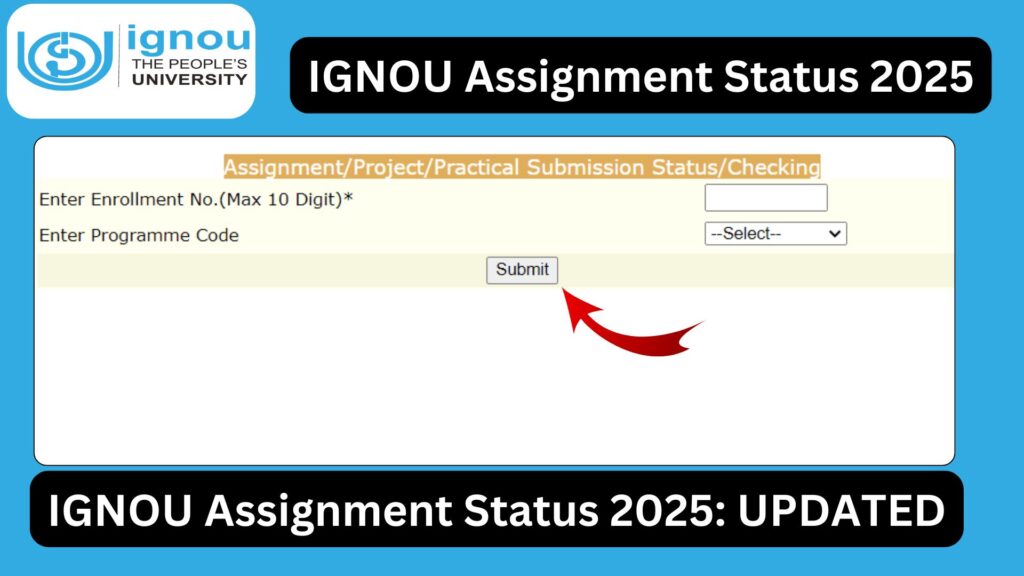
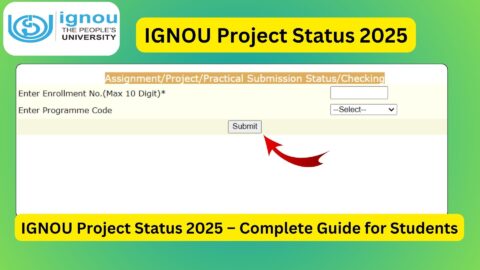
To check your assignment status, IGNOU has provided an online status checking link:
Check IGNOU Assignment Status 2025: https://isms.ignou.ac.in/changeadmdata/StatusAssignment.asp
This article provides a complete guide on how to check assignment status, what the different statuses mean, reasons why marks may be delayed, solutions for common problems, an important links table, FAQs, and a conclusion.
Understanding the Importance of IGNOU Assignment Status
Checking the assignment status is essential for every IGNOU student because it ensures that:
- Your assignment submission has been accepted
- Your assignment has reached the study centre
- The evaluator has checked the assignment
- Your marks are uploaded in the backend system
- You are eligible to appear in the Term-End Examination
IGNOU assignments contribute to 30 per cent of the final grade, while the theory examinations account for the remaining 70 per cent. Therefore, confirming your assignment status is as important as preparing for the examination.
What Is IGNOU Assignment Status?
The term “Assignment Status” refers to the online availability of information showing the progression of your submitted assignments. IGNOU typically displays the status under different categories:
1. Not Submitted
This means the assignment was not received or updated by the study centre.
2. Received
Assignments have been submitted and received by the study centre.
3. Under Evaluation
The examiner is currently checking the assignment.
4. Completed / Mark Updated
The assignment has been evaluated and the marks are uploaded in the system.
5. Pending
Sometimes, a course remains pending because the evaluation or upload is incomplete.
It is the responsibility of the student to check the status regularly, especially before examinations.
How to Check IGNOU Assignment Status 2025?
To make it easier for students, IGNOU has offered an online portal to track assignment status. The direct link to check the 2025 status is:
Check Assignment Status: https://isms.ignou.ac.in/changeadmdata/StatusAssignment.asp
Follow the step-by-step process below:
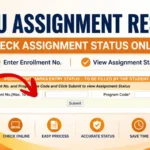
Step 1: Visit the Assignment Status Link
Open the above link in your browser.
Step 2: Enter Your Enrollment Number
Use your 9 or 10-digit enrollment number correctly.
Step 3: Choose Your Programme Code
Select your programme from the list, such as:
- BAG
- BCOMG
- MEG
- MPS
- MSO
- MBA
- MCA
- BCA
- BSCG
and many more.
Step 4: Select Your Study Centre Code
Enter or select your study centre code as assigned by IGNOU.
Step 5: Click on Submit
Your assignment status will be displayed on the screen.
Make sure to check the details for accuracy:
- Course code
- Submission date
- Evaluation status
- Marks updated or not
What Information Appears in IGNOU Assignment Status 2025?
Once you check the status online, you will see the following details:
1. Enrollment Number
Your unique identification number.
2. Programme Code
The programme you are enrolled in.
3. Study Centre Code
The center where you submitted your assignments.
4. Course Code-Wise Status
Each course will show whether the assignment is:
- Submitted
- Not submitted
- Under evaluation
- Completed
- Mark updated
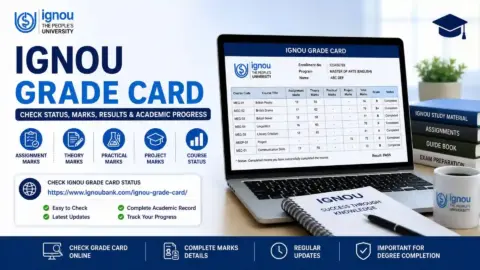
5. Assignment Marks
Once evaluated, marks will appear next to the course.
This information helps track your academic progress throughout the year.
When Does IGNOU Update Assignment Status?
IGNOU updates assignment status at different times depending on the academic session.
January Session
Updates usually begin from:
- April
- May
- June
and continue until September.
July Session
Updates generally start from:
- October
- November
- December
and continue until March of the next year.
Since evaluation is decentralized at study centres, uploading times may vary.
Reasons Why IGNOU Assignment Status Is Not Updated
Students frequently encounter issues where their assignment status does not show updates. The following may be the reasons:
1. Evaluation Delay
Due to high assignment volume, evaluators take time to assess the assignments.
2. Study Centre Delay in Uploading Marks
Even after evaluation, the study centre may delay sending marks to the regional centre.
3. Incorrect Details
Wrong enrollment number, programme code, or course code can cause errors.
4. Late Submission
Assignments submitted after the deadline are evaluated later.
5. Technical Issues
IGNOU’s portal may not be updated due to system maintenance or backend delays.
6. Partial Update
Some subjects may get updated first, leaving others pending.
If your status is not showing even after several weeks, contacting your study centre may help.
Difference Between Assignment Status and Assignment Marks
Many students confuse these two terms, but they have different meanings:
| Assignment Status | Assignment Marks |
|---|---|
| Shows whether your assignment is received and evaluated | Shows the marks scored after evaluation |
| Includes terms like received, under evaluation, completed | Marks are displayed as numbers |
| Uploaded earlier than marks | Uploaded later in the grade card |
How Long Should You Wait Before Taking Action?
If your assignment status shows:
- Not submitted for more than 40 days
- Not updated even after submission
- Under evaluation for more than 2 months
You should contact:
- Your study centre
- Your regional centre
Keep your:
- Submission receipt
- Enrollment number
- Course codes
ready for verification.
Tips to Ensure Your Assignment Status Updates Smoothly
To avoid delays or issues, follow these guidelines:
1. Always Keep Submission Proof
Never submit assignments without receiving a stamped acknowledgment.
2. Write Assignments Neatly
Handwriting should be clear and readable.
3. Use Correct Front Page Format
Include:
- Name
- Enrollment number
- Course code
- Programme code
- Study centre
- Session
4. Submit Before Deadline
Late assignments are evaluated much later.
5. Follow Guidelines Strictly
IGNOU provides instructions in the assignment booklet.
6. Do Not Copy
Copied assignments may get rejected.
Important Links and Information
Below is a table of essential IGNOU resources related to assignment status.
| Service | Purpose | Link |
|---|---|---|
| Assignment Status 2025 | Check assignment submission and evaluation status | https://isms.ignou.ac.in/changeadmdata/StatusAssignment.asp |
| Grade Card | View assignment and theory marks | Available on IGNOU official portal |
| Assignment Submission Guidelines | Instructions for assignment preparation | Provided in assignment booklets |
| Regional Centres | Contact for assignment-related issues | RC-specific websites |
| Study Material | Access course content | eGyanKosh |
| Student Zone | Access academic resources and notifications | ignou.ac.in |
Common Issues and Their Solutions
1. My assignment status shows Not Submitted
Check whether:
- You submitted it properly
- Study centre updated it
- You used correct details
Solution: Visit your study centre with submission proof.
2. My assignment status shows Under Evaluation for too long
Evaluators may take time. Let it continue for a few weeks.
Solution: After 60 days, contact your regional centre.
3. Only some assignments are updated
IGNOU updates course-wise, not all at once.
Solution: Wait for the next phase of updates.
4. Assignment submitted online but not updated
Online submissions take time to sync.
Solution: Keep checking and contact RC if needed.
FAQ about IGNOU Assignment Status Check 2025
How do I check IGNOU Assignment Status 2025?
Visit the official link:
https://isms.ignou.ac.in/changeadmdata/StatusAssignment.asp
Enter your enrollment number, programme code, and study centre code.
When are assignment statuses updated by IGNOU?
Updates are done in phases. January session updates begin from April onwards; July session updates start around October.
What does Under Evaluation mean?
It means your assignment has been received and is being assessed by the evaluator.
My status shows Not Submitted even though I submitted. What should I do?
Visit your study centre with your submission receipt to verify and request an update.
How long does IGNOU take to update assignment marks after evaluation?
Marks may take 30–60 days to reflect in the grade card.
Do I need to pass assignments and theory exams separately?
Yes, students must pass both the assignment and theory components to clear a course.
What is the passing mark for assignments?
The minimum passing mark is 40 percent.
Can assignments be re-evaluated?
Yes, but only through formal request procedures.
Can I submit assignments online?
Some programmes allow online submissions. Check with your regional centre.
What happens if I fail an assignment?
You must resubmit the assignment in the next cycle.
Conclusion
The IGNOU Assignment Status Check 2025 system plays a vital role in ensuring transparency and helping students track their academic progress. By regularly checking the status, you can confirm whether your assignments have been received, evaluated, and updated correctly.
The direct link provided makes it easier for students to access their status instantly:
IGNOU Assignment Status 2025: https://isms.ignou.ac.in/changeadmdata/StatusAssignment.asp
Since assignments carry significant weightage in the final evaluation, submitting them on time and ensuring their proper status update is essential. Students are advised to keep submission receipts, follow guidelines, and regularly check both assignment status and grade card updates.